 Firetool
Firestore GUI · Firebase desktop client for Windows, macOS and Linux
Your Firestore data, on your desktop. Safe for production.
Browse, query, edit and export Cloud Firestore data and manage Firebase Authentication users, with an audit log of every change, read-only access for support staff and rules that keep production data safe.
- Free to browse, query and filter
- Keys and data stay on your computer
- Audit log of every change
- No Firetool server in between

Works everywhere your team does
Features
A Firestore viewer, editor and query tool in one window
Everything you do in the Firebase console, and the things it can't do: exports, bulk changes, copies between projects, JS queries and a full audit trail.
Browse and query
Filter, sort and page through any collection or collection group. Count, sum or average without loading everything.
Learn more →JS queries
Admin SDK-style scripts for reports and bulk updates, with transactions, aggregations and vector search.
Learn more →Edit and import
Edit in the table or as JSON with exact types. Set, rename or delete a field in every matching document.
Learn more →Export and back up
CSV that opens cleanly in Excel, or JSON. Back up and restore collections with their subcollections.
Learn more →Data transfer
Copy chosen collections between projects and databases, adding only new documents if you like. Stop and resume.
Learn more →Authentication users
Find, create, disable and delete users, edit custom claims and make password reset links.
Learn more →Audit log
Who changed what, when and why, with a restorable copy of every edited or deleted document.
Learn more →Production and read-only
Mark a project or one database as production or read-only. Deletes and bulk changes ask for the project ID.
Learn more →Scheduled exports
Daily or weekly CSV snapshots with a SHA-256 checksum, even when the app is closed.
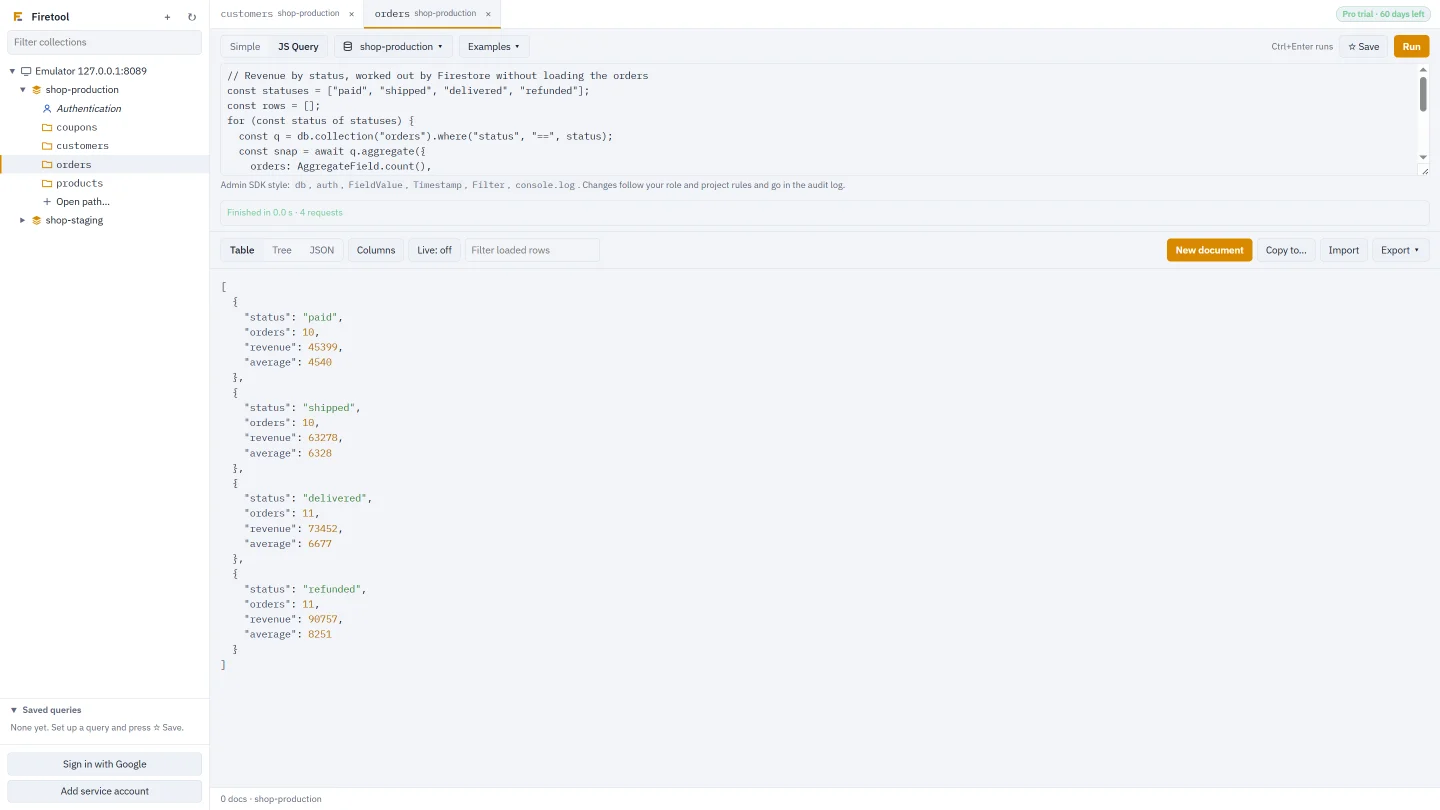
Learn more →JS queries
Write it like the Admin SDK, see it as a table
Counts, reports and one-off fixes in the Firebase Admin SDK style you already know, run in an isolated process that can't touch your files.
- Transactions, batches,
FieldValueand aggregations - Vector search and query explain
- Every write goes through the same safety checks as the rest of the app
Whole collections
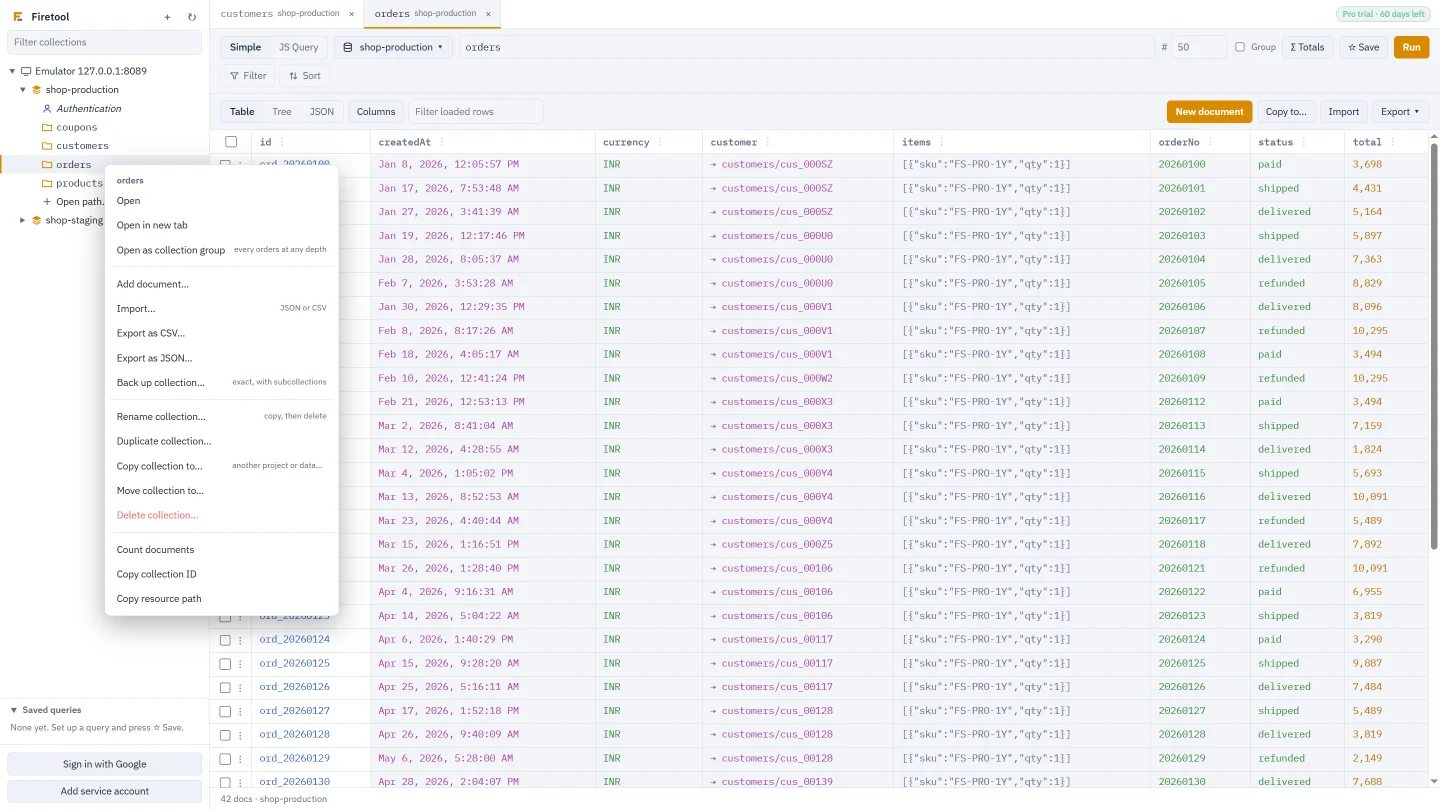
Copy, move, back up or rename whole collections
Right-click a collection or database for everything you'd otherwise script: copy to another project, duplicate, rename, back up with subcollections, restore, count and delete.
- References are pointed at the new project
- Busy or briefly unavailable Firestore is retried; long jobs resume where they stopped
- Existing documents: replace them or keep them and add only new ones
For regulated teams
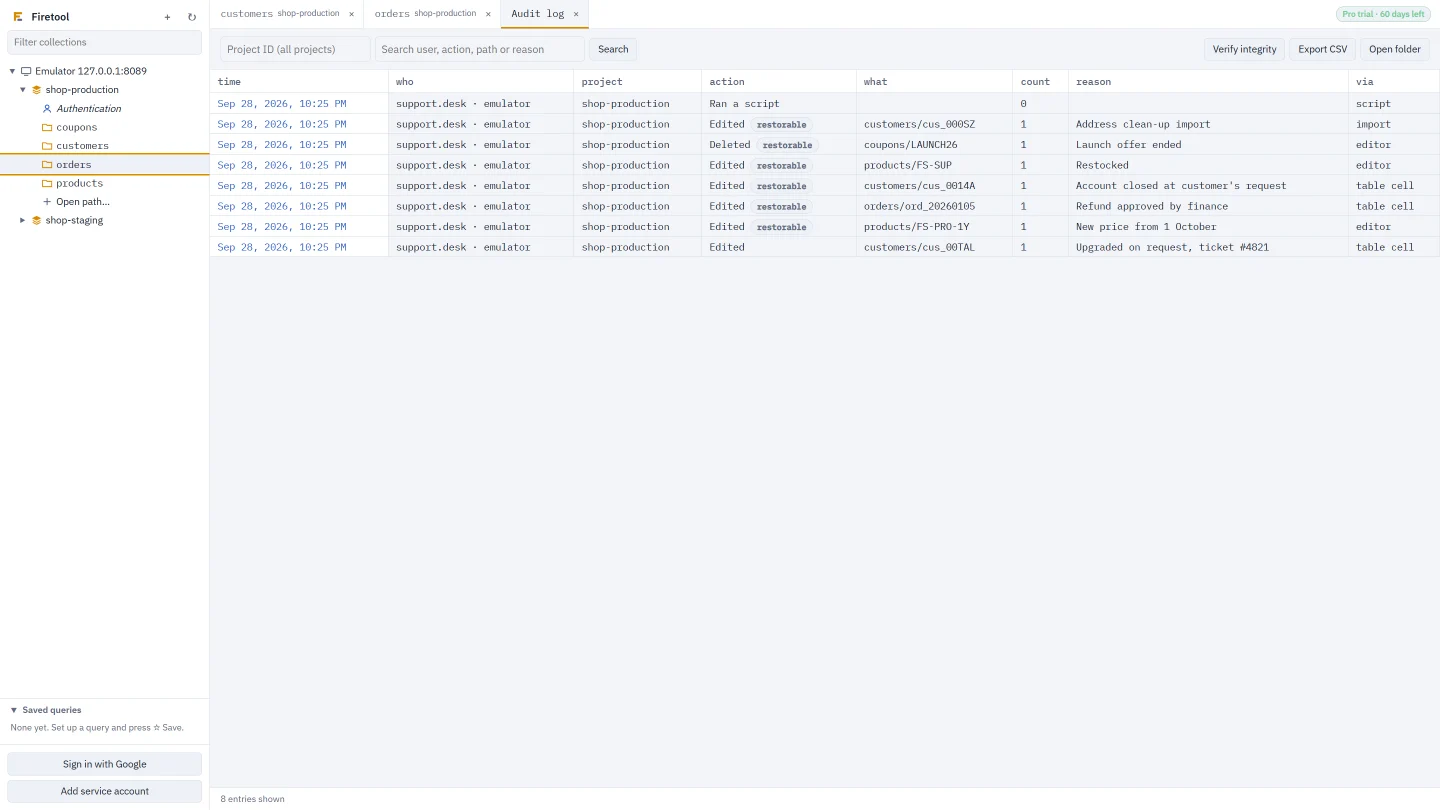
Every change recorded, and the dangerous ones stopped
Mutual fund distributors, brokers and other regulated businesses need to know who changed what. Firetool records it with a copy you can restore, and asks before anything risky in production.
- Tamper-evident audit log with restorable copies
- Read-only access for support staff
- Policies that IT sets for every PC
Firebase Authentication
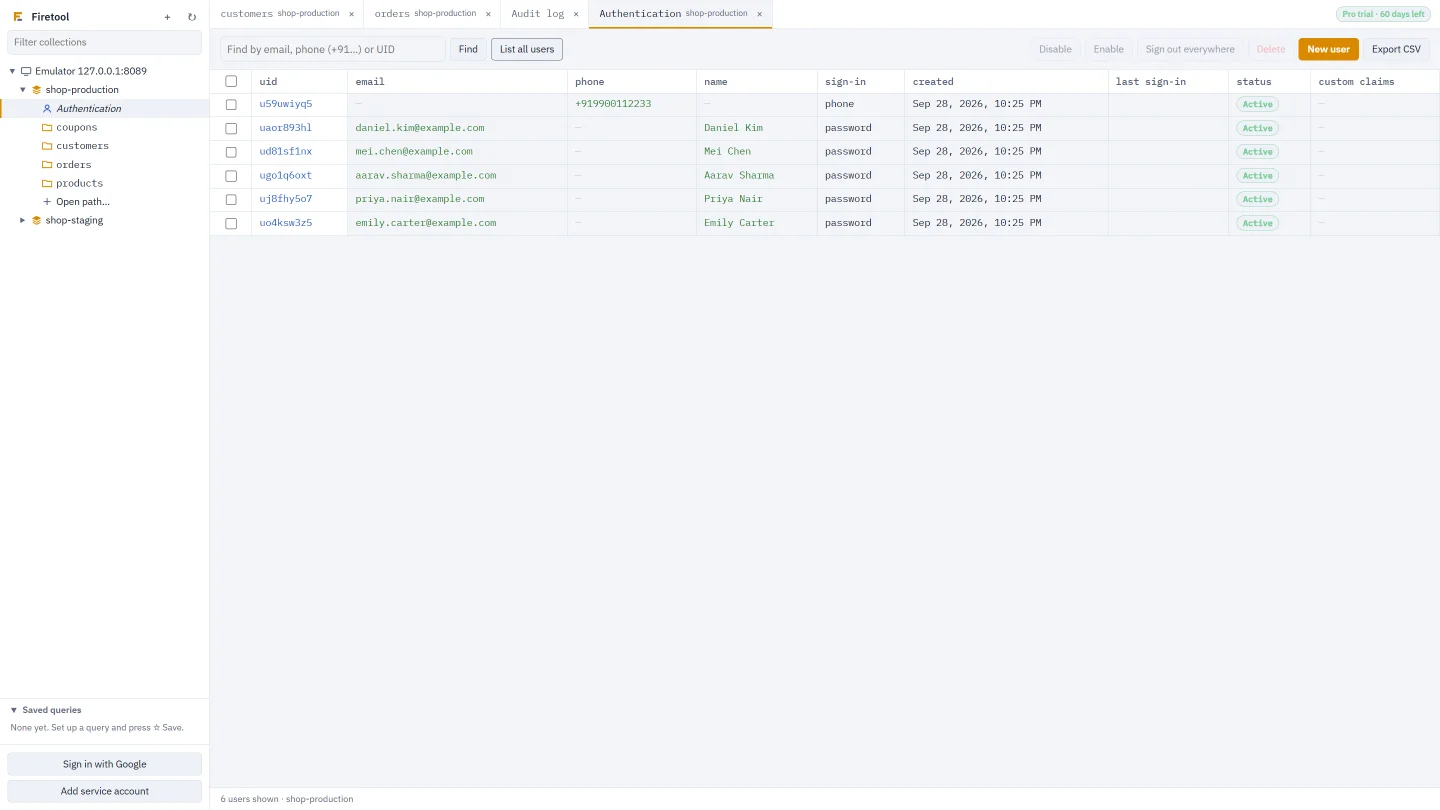
Look up and manage users without the console
Find users by email, phone number or UID, then disable, delete, edit custom claims, make password reset or verification links, or sign them out everywhere.
- Changes are recorded in the audit log
- Export users to CSV
How it works
Up and running in two minutes
No server to set up and nothing to install in your Firebase project.
Download
Choose your system and download the installer, no email needed. It installs for you only, without admin rights.
Connect
Sign in with Google, add a service account key, or connect to the emulator. Every project you can reach appears in the sidebar.
Work safely
Browse, query, edit and export. Mark production projects so the risky things ask first, and every change is logged.
Pricing
Free, with a 30-day Pro trial
Every Pro feature free for 30 days: enter your email in the app and confirm it with the code we send. No key and no card.
Free
Free, for as long as you like
- Browse, filter and query collections and collection groups
- Read documents as a table, a tree or JSON
- Look up Authentication users
Pro trial
30 days, one per person and computer
- Every Pro feature
- Just confirm your email: no key, no card
- Afterwards it keeps working as Free
Pro
Licence per person, per year
- Edit, import, delete, copy and restore
- JS Query, exports and scheduled exports
- Authentication user changes
Security
Your data stays between you and Google
What Firetool does with your keys and data, for whoever reviews your software.
Keys stay on your computer
Service account keys are encrypted by your system (Windows DPAPI, the macOS Keychain or the Linux keyring). They're never sent to us.
Straight to Google
Firetool talks directly to Google's Firestore and Firebase Authentication APIs. There's no Firetool server in between.
Nothing listening
No local web server and no incoming connections. It only asks firetool.in about updates and your licence.
Questions
Common questions
Is there a Firestore GUI for Windows, Mac and Linux?
Yes. Firetool runs on Windows 10 and 11 (64-bit and 32-bit), macOS 11 or newer (Apple Silicon and Intel) and 64-bit Linux. It shows your collections in a sidebar and your documents as a table, a tree or JSON.
Is Firetool free?
Yes. The Free edition lets you browse, filter and query your data for as long as you like, and every computer gets a 30-day trial of every Pro feature.
How do I export Firestore data to CSV or Excel?
Open the collection or query and choose Export, then CSV. The file opens cleanly in Excel, with nested fields as their own columns. JSON export is also available, and exports can be scheduled.
Can I copy a collection to another Firebase project?
Yes. Use Tools, Data transfer to copy chosen collections with their subcollections to another project or database, or right-click a collection and choose Copy. You can keep documents that already exist and add only new ones.
Is my Firebase data sent to your servers?
No. Firetool talks directly to Google's APIs from your computer, and your keys stay on your computer.
Download Firetool
Free for Windows, macOS and Linux, with every Pro feature for the first 30 days.